For permanent, always-on coverage, wired PoE cameras are the better bet. For fast, temporary, or renter-friendly setups, wireless wins. In practice, the smartest homeowners and small businesses split the difference: wire the entry points that need constant uptime, then fill gaps with wireless.
TL;DR:
- Wireless cameras are easier and faster to install, especially for renters, but depend on Wi-Fi or cellular signals and have shorter battery life in cold weather environments.
- A typical 4-camera wired setup takes 4 to 8 hours to install, while the same number of wireless cameras can be set up in just 30 to 60 minutes, mostly due to app configuration.
- Long Ethernet runs should stay under 200 feet to preserve signal quality, and network infrastructure must be capable of handling 32 to 48 Mbps for 4K camera streams.
- Hybrid systems are common, with critical entry points wired for reliability and others wireless for flexibility, depending on property layout and budget constraints.
Table of Contents
- Wired vs Wireless Cameras: A Side-By-Side Comparison
- How Do PoE Wired Cameras Actually Work?
- What Are the Real Benefits and Drawbacks of Wireless Cameras?
- How Long Does It Take to Install 4 Cameras?
- Will Your Network Handle It, and What Happens in an Outage?
- How Long Do These Systems Actually Last?
- Wired, Wireless, or Both? A Scenario Checklist
- Smartsavvyhome's Recommendations and Setup Notes
- An Editorial Take on the Wired vs Wireless Debate
- Sources
- FAQ
Wired vs Wireless Cameras: A Side-By-Side Comparison
The numbers tell the story faster than any pros-and-cons list. Here's how a typical 4-camera setup compares across the factors that actually determine whether you're happy with your system a year from now.
Three differences decide most buying decisions:
- Wired cameras keep recording when your Wi-Fi drops; wireless cameras usually don't.
- Wireless costs less upfront but adds up over five years through cloud fees and battery replacements.
- Wired setups take a full afternoon to install; wireless takes about an hour.
How Do PoE Wired Cameras Actually Work?
Power over Ethernet (PoE) is the backbone of most modern wired systems. A single Cat5e or Cat6 cable carries both the data feed and 15 to 30 watts of power to each camera, so you're not running a separate power line to every mounting point. One cable, one connection, done.
That simplicity pays off in reliability. Wired systems rarely go offline because they don't depend on your home's Wi-Fi signal at all. They record continuously to a network video recorder (NVR), support higher resolutions without choking your bandwidth, and need almost no day-to-day maintenance.
The trade-offs are real, though. Running cable is labor-intensive, especially through finished walls or across a detached garage. Upfront costs run higher, and if your power goes out, the whole system goes dark unless you've added a battery backup. Exposed exterior wiring can also be cut or tampered with if it isn't routed carefully.
Expect a wired camera to last 5 to 10 years with basic upkeep, and expect uptime numbers in the high 90s.
- Single cable delivers data and power together.
- Continuous recording to a local NVR, no cloud dependency required.
- Higher resolution support without straining your home network.
- Downsides: labor cost, exposed wiring risk, needs a UPS for outages.
Pro Tip: If you're wiring a detached structure, keep the cable run under 200 feet even though Ethernet is rated for roughly 328 feet. Shorter runs preserve signal quality and give you room for future upgrades.
What Are the Real Benefits and Drawbacks of Wireless Cameras?
Wireless isn't one category. You've got Wi-Fi cameras that connect straight to your router, proprietary RF cameras that talk to a dedicated hub, and cellular cameras that skip your home network entirely and use a data plan instead. Each solves a different problem.
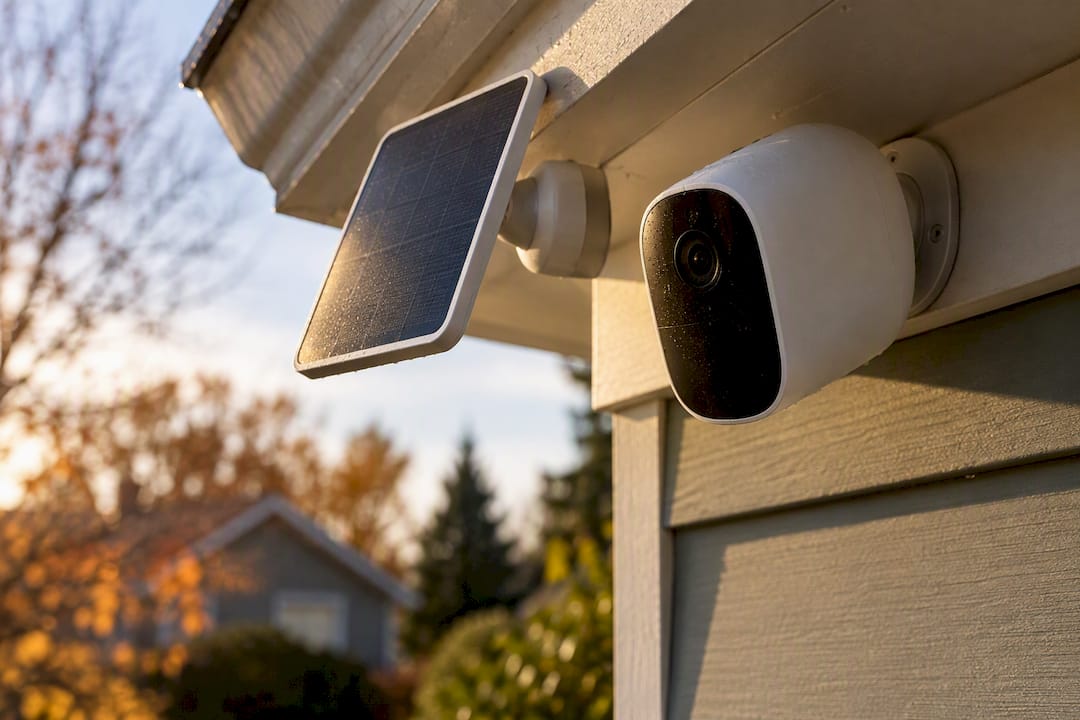
Battery life is where expectations often go wrong. Most battery-powered wireless cameras last 3 to 6 months per charge under normal conditions, but cold weather can cut that down to just 4 to 8 weeks. Solar panel add-ons help close the gap for outdoor units that get consistent sun exposure.
The appeal is obvious: no drilling, no cable runs, and you can move a wireless camera to a new spot in minutes. That portability makes it the default choice for renters and anyone testing out a new location before committing to a permanent setup.
The catch is dependency. A wireless camera is only as reliable as your Wi-Fi or cellular signal, and most cloud storage plans carry a monthly fee. Poorly secured wireless cameras also present a larger attack surface for hackers than a closed, local wired system.
- Wi-Fi, proprietary RF, and cellular each trade convenience for different limitations.
- Battery life drops sharply in cold climates, sometimes by half.
- Fast to install and easy to relocate, ideal for renters.
- Ongoing costs include cloud subscriptions and periodic battery swaps.
How Long Does It Take to Install 4 Cameras?
Planning a small system comes down to time, hardware, and who's doing the work. A 4-camera wired PoE job typically takes 4 to 8 hours, including running cable, mounting hardware, and configuring the NVR. The same wireless job takes 30 to 60 minutes, most of which is app setup.
Here's a practical rundown for a 4-camera project:
- List your hardware. Four cameras, a PoE switch or NVR with enough ports, Cat6 cable sized to your longest run, and a hard drive sized for your retention needs (2 to 4 TB covers most homes).
- Decide DIY vs. professional install. DIY wired installs save labor cost but demand comfort with fishing cable through walls or attics; professional installation for four cameras commonly runs several hundred dollars in labor depending on your market and home layout.
- Bring in an electrician if needed. Any run near a breaker panel, or any camera requiring a dedicated outlet, is worth handing to a licensed electrician rather than guessing.
- For wireless, budget for batteries or solar mounts and factor in a cloud storage subscription before you calculate total cost.
- Hand a pro your requirements in writing: camera count, coverage zones, resolution needs, and whether you want local or cloud storage.
Will Your Network Handle It, and What Happens in an Outage?
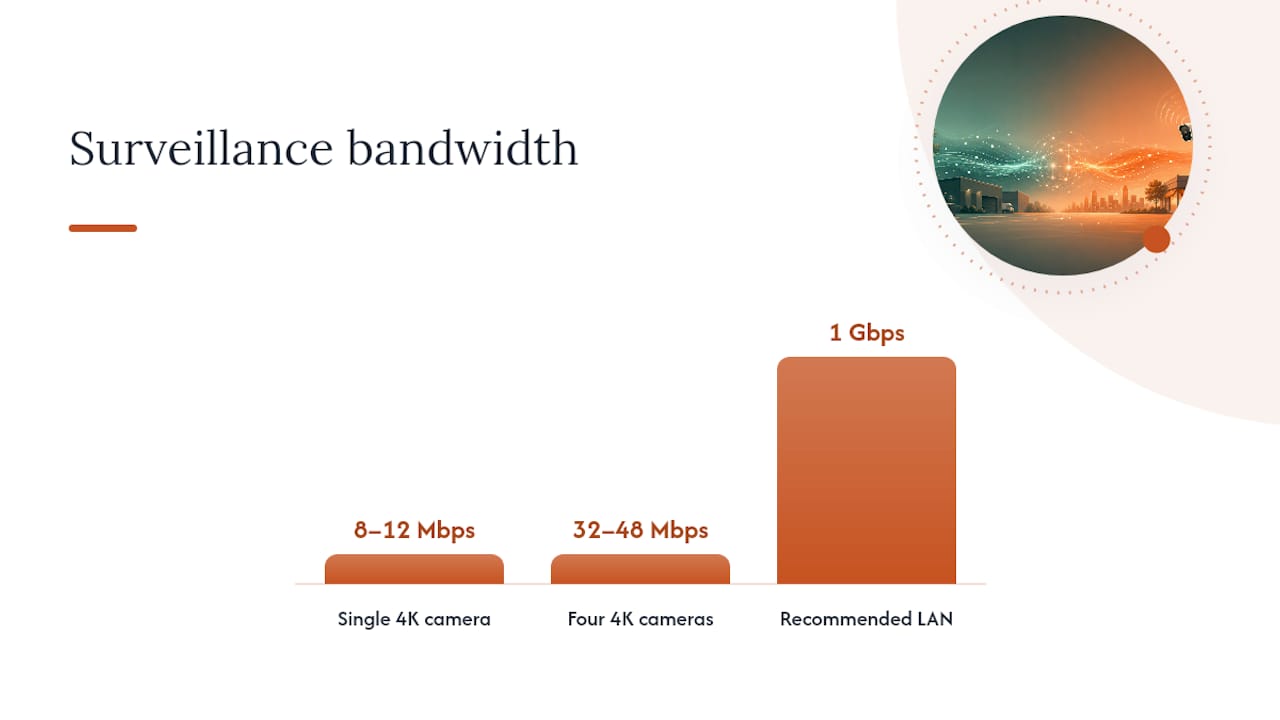
Bandwidth planning is the step most homeowners skip, and it's the one that causes the most frustration later. A single 4K camera streams roughly 8 to 12 Mbps continuously, so four cameras can easily demand 32 to 48 Mbps just for surveillance, on top of whatever your household is already streaming or gaming on.
| Setup element | Recommendation |
|---|---|
| Camera traffic | Isolate on a separate VLAN or dedicated PoE switch |
| Network speed | Aim for a 1 Gbps LAN for multi-camera 4K systems |
| Local storage | NVR with 2 to 4 TB HDD for 7 to 30 days of retention |
| Power backup | UPS on the PoE switch and NVR |
| Wireless backup | Battery or solar for cameras without a wired outlet |
Local NVR storage keeps recording even if your internet goes down, since the footage never has to leave the building. Cloud storage is more convenient for remote viewing but adds a recurring fee and stops working the moment your connection drops.
Pro Tip: Put your cameras on their own VLAN or a dedicated PoE switch. It keeps a firmware update or a bandwidth spike from ever competing with your Netflix stream, or worse, dropping a recording during an actual event.
How Long Do These Systems Actually Last?
Wired cameras hold up well, typically running 5 to 10 years before you'd consider replacing them. Battery packs in wireless units are the weak link, degrading noticeably after 2 to 3 years of daily charge cycles.
Recurring costs add up differently depending on your setup: battery swaps, cloud storage fees, and eventual hard drive replacement for the NVR all factor into your real five-year cost, not just the sticker price you paid on day one.
Cold weather remains the biggest wildcard for wireless owners, cutting battery life and reducing solar panel output right when winter days are already short.
- Check battery health and camera firmware every 3 to 6 months.
- Replace NVR hard drives proactively around year 4 to 5, before failure.
- Swap wireless camera batteries at the first sign of shortened runtime.
- Clean camera lenses and housings seasonally, especially before winter.
Wired, Wireless, or Both? A Scenario Checklist
Most properties don't fit neatly into one category, and that's exactly why hybrid systems have become the practical standard for homeowners and small businesses alike.
- Owner-occupied single-family home: Wire the front door, driveway, and any garage entry points; use wireless for the backyard shed or side gate.
- Renter: Go fully wireless. You can't run cable through a landlord's walls, and portability matters if you move.
- Small storefront: Wire the register area and main entrance for consistent quality; wireless works fine for a stockroom or loading dock.
- Long driveway or detached outbuilding: Wireless or cellular, since running cable that distance often exceeds practical Ethernet limits.
Before you commit, run through this checklist: Do you own the property outright? Do you need near-constant uptime or just occasional coverage? What's your total budget, not just the sticker price? Can you get a cable run to the spot you need, or is an installer required? And honestly, how good is your Wi-Fi signal at that exact location?
Smartsavvyhome's Recommendations and Setup Notes
Cameras are best evaluated through lab checks alongside real-world installs, tracking uptime and connection stability over time rather than relying on a single afternoon of testing. For entry points and anywhere image quality matters most, a PoE camera is the safer bet. For sheds, gates, and rental units, a battery or solar wireless camera does the job without the cable run.
A quick setup checklist worth keeping handy:
- Map your coverage zones before buying anything.
- Size your NVR storage to at least 7 days of retention.
- Isolate camera traffic on its own network segment.
- Add a UPS to any wired system's power supply.
- Check wireless battery levels monthly, more often in winter.
An Editorial Take on the Wired vs Wireless Debate
Most people frame this as an either/or decision, and that's the mistake. The data on uptime and five-year costs makes a strong case for wiring anything permanent, but insisting on an all-wired or all-wireless system usually means overpaying somewhere. Match the camera to the location, plan for what happens when the power or Wi-Fi fails, and check Smartsavvyhome's setup guides before you buy a single unit.
— Alphonso
Sources
- Wireless vs Wired Security Cameras 2026: Which Is Better?
- Wired vs. Wireless vs. WiFi Security Cameras: Pros, Cons, and Key Differences
- How much internet speed do I need for smart home devices?
- Wired vs wireless security cameras: How to choose which is best for you
FAQ
Is a Wired or Wireless Camera Better?
Neither wins outright. Wired cameras are better for permanent, always-on coverage, with uptime near 99.9%, while wireless cameras are better for renters or temporary spots where fast setup matters more than constant reliability.
What Are the Disadvantages of Wireless Cameras?
Wireless cameras depend on your Wi-Fi or a cellular data plan, so a dead battery or a weak signal can take them offline. Battery life typically runs 3 to 6 months, dropping to as little as 4 to 8 weeks in cold weather, and most models add recurring cloud storage fees.
Can a Security Camera Be Both Wired and Wireless?
Yes, and many households run exactly this kind of hybrid setup, wiring critical entry points while placing wireless cameras in spots that are hard or expensive to cable. Most modern NVR systems support mixed camera types on the same network without issue.
What Are the Downsides of Using Wired CCTV Cameras?
Wired cameras cost more upfront, typically $300 to $800 for a 4-camera setup, and installation usually takes 4 to 8 hours or requires a professional. They also lose recording ability during a power outage unless you've added a battery backup for the NVR and PoE switch.